Mastering Canva: A Creative Toolkit for All
Visual communication is now part of everyday teaching, training and project work. Educators are expected to create materials that are clear, engaging, fast to produce and adaptable to different learners, but most professionals still use only a small part of what Canva can do.
This course helps participants move from basic Canva use to confident, practical content creation. Over 6 days, educators and professionals learn how to create lesson materials, presentations, worksheets, campaigns, community resources and interactive learning content using Canva and its AI-powered features.
The focus is not only on making things look good, but on saving time, improving communication and producing resources that can be used immediately in classrooms, Erasmus+ projects and community initiatives. Participants work with Canva’s most useful tools and AI features, including text generation, image creation, photo enhancement, AI voiceovers, Dream Lab, Canva Sheets and Magic Charts, Learn Grid, magic layers, design through conversation and scheduling tools.
The course also introduces Canva for Education, including support for activating free Teacher Pro access for eligible educators, so participants can continue using advanced features after the training. For participants who request it in advance and already have stronger digital confidence, the course can also include a workflow in Affinity as an additional design option alongside Canva.
By the end of the course, participants leave with stronger design confidence, practical AI-supported workflows and ready-to-use materials they can apply straight away in their own professional context.
Why This Course Matters
What Participants Learn
- Create lesson plans, worksheets, newsletters and community resources using Canva templates and design tools.
- Edit and create images, create videos, integrate audio, add AI voiceovers and apply animations for more engaging learning materials.
- Use Canva AI features for text generation, image creation, photo enhancement and creative support.
- Set up and manage Canva for Education, including class organisation, student collaboration and assignment workflows.
- Design interactive learning materials such as quizzes, polls, choice boards and visual classroom resources.
- Create multilingual and culturally responsive content for diverse learners and communities.
- Use Canva Sheets with Magic Studio to personalise certificates, reports and graphics at scale.
- Design Canva Forms for surveys, feedback and registration processes.
- Use Canva AI Chat and Canva Code 2.0 to develop more interactive, creative and practical outputs.
- Explore Affinity as an additional design option for more advanced or complex projects when requested in advance.
How the Course Works
- Hands-on learning from Day 1, with participants creating real materials linked to their own educational or community context.
- Step-by-step progression from Canva fundamentals to more advanced AI-supported workflows.
- Project-based practice focused on classroom resources, visual communication and community storytelling.
- Guided exploration of Canva AI features, including text generation, image creation, photo enhancement, voiceovers and AI-supported design support.
- Practical support for activating and using Canva for Education free Teacher Pro access for eligible educators.
- Real-time demonstrations and practice with Canva AI Chat, Canva Forms, Canva Sheets with Magic Studio and Canva Code 2.0.
- Accessibility and inclusion focus, with attention to multilingual, visually clear and culturally responsive content.
- Optional introduction to Affinity for participants who request an additional advanced design layer in advance.
- Continuous feedback and support to help participants adapt the tools to their own learners, projects and professional needs.
-
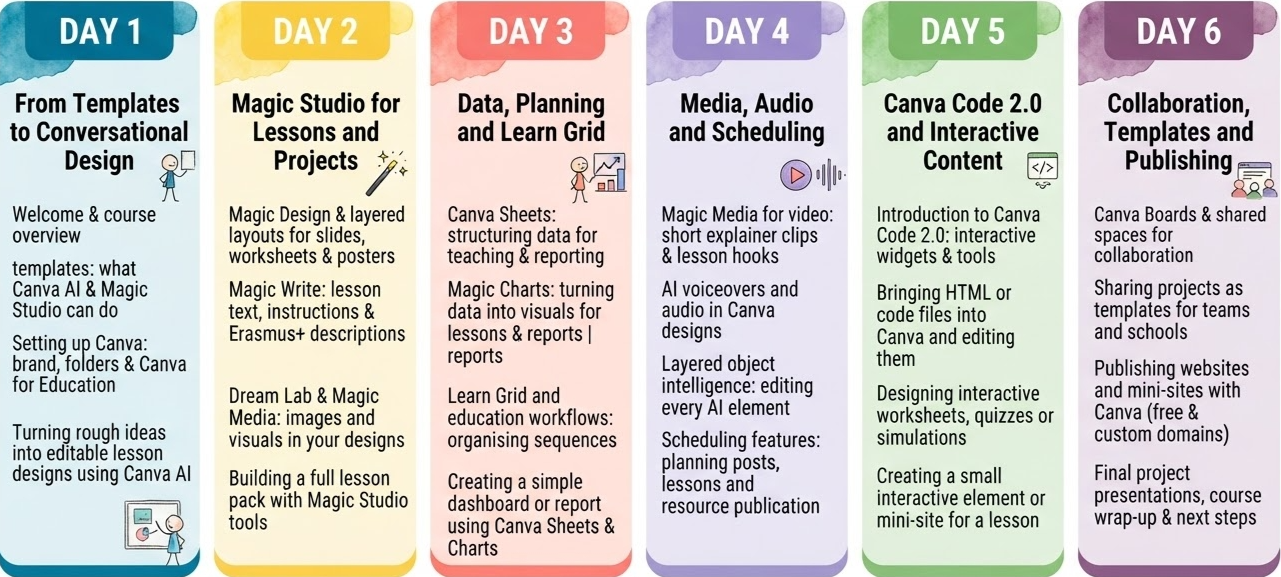
09:00–09:30 | Welcome, course overview and introductions
09:30–10:15 | Moving beyond basic templates: what Canva AI and Magic Studio can do for educators
10:15–10:30 | Coffee break
10:30–11:15 | Setting up and personalising your Canva account, including brand, folders and Canva for Education
11:15–12:00 | Introduction to Canva AI: design through conversation and “Design for me”
12:00–13:00 | Practical session: turning rough ideas into editable lesson designs using Canva AI
13:00–14:00 | Reflection and sharing: first wins and questions
-
09:00–09:30 | Recap and warm-up
09:30–10:15 | Magic Design and layered layouts: creating presentations, worksheets and posters in minutes
10:15–10:30 | Coffee break
10:30–11:15 | Magic Write: generating lesson text, instructions, captions and Erasmus+ project descriptions
11:15–12:00 | Dream Lab and Magic Media: generating images and visuals directly in your designs
12:00–13:00 | Practical work: building a full lesson pack (slides + worksheet + handout) using Magic Studio tools
13:00–14:00 | Group feedback and improvements
-
09:00–09:30 | Recap and check-in
09:30–10:15 | Canva Sheets: structuring data for teaching, assessment or project reporting
10:15–10:30 | Coffee break
10:30–11:15 | Magic Charts: turning data into visuals for lessons, dashboards and Erasmus+ reports
11:15–12:00 | Learn Grid and education workflows: organising content and learning sequences
12:00–13:00 | Practical work: creating a simple dashboard or report using Canva Sheets and Magic Charts
13:00–14:00 | Reflection: how data visuals can support teaching and project management
-
09:00–09:30 | Recap and media warm-up
09:30–10:15 | Magic Media for video: creating short explainer clips and lesson hooks with AI support
10:15–10:30 | Coffee break
10:30–11:15 | AI voiceovers and audio: integrating narration and sound into Canva designs
11:15–12:00 | Layered object intelligence: editing every element in AI-generated designs
12:00–13:00 | Scheduling features: planning posts, lesson releases or resource publication from within Canva
13:00–14:00 | Practical work: building a short media piece (video + audio) and scheduling its use
-
09:00–09:30 | Recap and code warm-up
09:30–10:15 | Introduction to Canva Code 2.0: generating interactive widgets, simple games and tools with prompts
10:15–10:30 | Coffee break
10:30–11:15 | Bringing HTML or code files into Canva and making them editable
11:15–12:00 | Designing interactive worksheets, quizzes or visual simulations using Canva Code
12:00–13:00 | Practical work: creating a small interactive element or mini-site for a lesson or Erasmus+ project
13:00–14:00 | Sharing and feedback on interactive designs
-
09:00–09:30 | Recap of key tools and workflows
09:30–10:15 | Canva Boards and shared spaces: organising projects and collaborating with colleagues
10:15–10:30 | Coffee break
10:30–11:15 | Sharing projects as templates: enabling reuse and collaboration across teams and schools
11:15–12:00 | Publishing websites and mini-sites created with Canva (free and custom domains)
12:00–13:00 | Final project work: assembling a cohesive toolkit (lessons, visuals, interactive elements) for your context
13:00–14:00 | Presentation of final projects, course wrap-up and next steps
What Participants Take Back
- The ability to create lesson materials, presentations, worksheets, newsletters and community resources with greater speed and confidence.
- Practical experience using Canva’s core tools for photo editing, video creation, audio integration, voiceovers and visual storytelling.
- Stronger confidence in using Canva AI features for text generation, image creation, photo enhancement and creative support.
- The ability to set up and use Canva for Education for classes, student collaboration and assignment workflows.
- Experience creating interactive learning content such as quizzes, polls, choice boards and classroom activities.
- Practical ways to design multilingual, inclusive and visually clear materials for diverse learners and communities.
- Better workflows for personalising certificates, reports and visual resources using Canva Sheets with Magic Studio.
- Greater confidence in collecting feedback and organising registrations through Canva Forms.
- A clearer understanding of how Canva AI, Canva Code 2.0 and optional Affinity workflows can support more creative and practical educational outputs.
Course Format
Duration: 5-6 training days.
Daily workload: 4–5 hours per day, Monday to Friday, with optional cultural or networking activities depending on the location.
Language: English.
Language requirement: participants should have at least an A2/B1 level of English to actively follow the training and take part in discussions and practical work.
Digital level: no advanced IT knowledge is required for this course; basic confidence using a laptop and online tools is enough. Previous experience with AI tools is a plus, but not necessary
Equipment: participants must bring their own laptop, as devices are not provided during the training.
Target groups: teachers, trainers, school leaders, adult educators, VET staff, Erasmus+ coordinators, and other education professionals.
Adaptation: course examples and activities are adapted to the profile, experience, and educational context of the enrolled group whenever possible.
Funding fit: this course is designed to align with Erasmus+ KA1 staff mobility priorities for SCH, ADU and VET participants.
Course Fee
€80 per participant, per training day
This course fee is designed to align with Erasmus+ KA1 staff mobility funding for eligible SCH, ADU and VET participants.
What is Included:
✔Erasmus+ Fundable: eligible for KA1 grants
✔Flexibility Guaranteed: easy changes with minimal restrictions
✔Full experience: coffee breaks to cultural visits
✔ Certificate of attendance: 5 hours per day, 30h total
Post-Course Training: 80€ voucher on 18+ courses
Travel and Stay Support
We support participants with practical guidance before arrival so they can organise their mobility with more confidence.
We suggest:
✔Accommodation options such as hotels and apartments,
✔Local transportation information, and, airport transfer options,
✔ Half-day and full-day trip ideas, cultural activities and useful local recommendations.
These services are not directly provided by Colony of Creators unless explicitly confirmed in advance, but we do help participants identify the most suitable options for their stay and make the most of their Erasmus+ experience.
100% funded by the Erasmus Plus Program through your Erasmus+ SCH, ADU or VET grant.
Eligible institutions may use Erasmus+ KA1 mobility funding to cover course-related costs according to their approved budget and funding rules.
Request Information About This Erasmus+ AI Course
If you are a teacher, trainer, school leader or Erasmus+ coordinator interested in Smart Teaching: AI-Driven Solutions with ChatGPT and Beyond, use this form to request course details, dates, group options or support for Erasmus+ planning.