AI Assistant: Automations, Smart Flows for Educators & Trainers
Why This Course Matters
Many educators and trainers are overwhelmed by repetitive tasks, fragmented tools and growing administrative demands. AI assistants and simple automation systems can reduce that pressure, but only if professionals know how to use them in a structured, critical and practical way.
This course helps participants move from occasional AI use to a more intentional workflow. Over 6 days, educators explore how AI assistants can support planning, communication, content creation, project coordination and everyday organisation. They test real tools, build practical flows and learn how to maintain human oversight while using AI more effectively.
By the end of the course, participants leave with stronger digital confidence, clearer workflow systems and a personalised strategy for using AI assistants in their own educational context.
What Participants Learn
- Understand how AI assistants can support everyday educational and training workflows.
- Use tools such as ChatGPT, Gemini and Claude for planning, drafting and communication tasks.
- Create visual learning materials, presentations and worksheets with Canva AI.
- Use NotebookLM to turn existing materials into more interactive learning resources.
- Organise projects, tasks and documents more efficiently with Notion and Notion AI.
- Understand how simple automations work through triggers, actions and workflow logic.
- Build practical automation flows with Make.com to reduce repetitive tasks.
- Explore audio and accessibility tools such as ElevenLabs for narration and content support.
- Evaluate AI outputs critically and apply human judgment in every step.
- Design a personalised AI-supported workflow for their own teaching or training context.
How the Course Works
- Short expert input followed by immediate hands-on practice.
- Guided use of AI assistants and workflow tools for real educator tasks.
- Individual and collaborative activities focused on planning, communication and course design.
- Practical workshops on automation, content creation and workflow organisation.
- Reflection on ethical use, critical evaluation and human oversight.
- Peer exchange with educators and trainers from different countries and sectors.
- Continuous connection between course tasks and participants’ own professional context.
- Final strategy design so each participant leaves with a personalised AI-supported workflow.
-
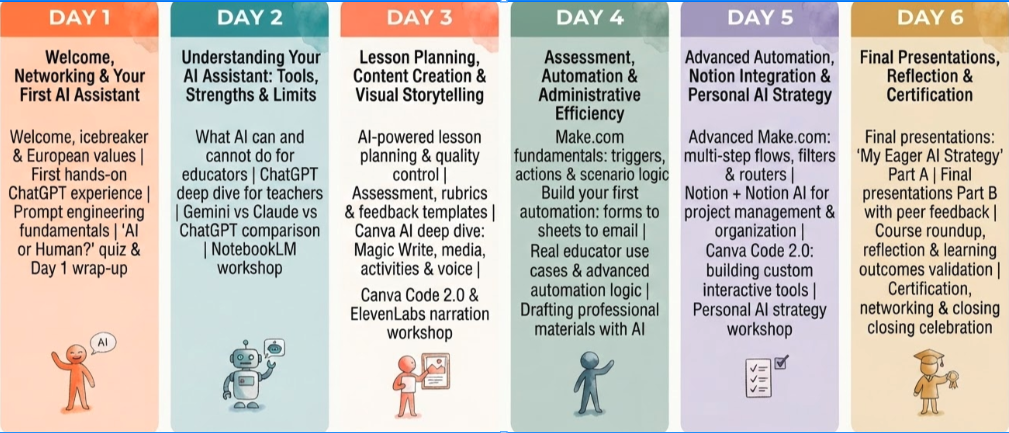
9:00–9:30: Welcome, introductions, and course overview.
9:30–10:30: What Is Intelligence? Defining human and artificial intelligence, the probabilistic nature of both, and why it matters.
10:45–11:00: Coffee break.
11:00–12:00: The Building Blocks of AI: Machine Learning, NLP, Deep Learning, and Generative AI — how they connect and why they matter in education.
12:00–13:00: LLMs, Transformers, GPTs, and the Black Box: What actually happens inside AI systems, and why a human must always be in the loop.
13:00–14:00: AI in Schools: the stochastic parrot, the cave wolf, the black box — metaphors, ethics, and group discussion on AI’s potential and risks.
-
9:00–10:00: AI in Education: personalised learning, learning at your own pace, and how AI is changing what students need to know.
10:00–11:00: Introduction to Prompt Engineering: the T-C-R-E-I, R-O-S-E, and S-C-E-T frameworks. Build your own detailed prompt.
10:45–11:00: Coffee break.
11:00–12:00: Understanding different GPTs and their strengths. Simple vs. detailed prompts. Prompt engineering practice.
12:00–14:00: Creativity and AI: the Creativity Showdown, why constraints unlock creativity, Style Shifting for diverse learners, neurodiversity, and scaffolding with AI. Discussion: how could personalised AI change your classroom?
-
9:00–10:00: Horizontal vs. Vertical AI Transformation. How diffusion models and GANs create images. AI vs. Real: Can you tell the difference?
10:00–11:00: Image prompting practice. Fine-Tuning vs. Prompting: understanding the difference and when to use each.
10:45–11:00: Coffee break.
11:00–12:00: Ways to create AI Video. Video prompting, case studies, and AI Presentations & Graphics.
12:00–14:00: AI music, voice overviews, and audio enhancers. AI Presentation Process with Nano Banana Pro & Google Slides. Hands-on creation and peer showcase.
-
9:00–10:00: Designing assessments, quizzes, and grading rubrics with AI. The AI Sandwich Methodology: keeping humans in the driver’s seat.
10:00–11:00: Lesson planning with AI: advanced templates, scaffolding for diverse learners, and using AI for administrative tasks.
10:45–11:00: Coffee break.
11:00–12:30: NotebookLM: Your AI Research Partner. Exploring all Magic Studio features: audio overviews, guides, timelines, and practice.
12:30–14:00: Google Gems: creating a Gem and why it empowers teachers. Voice Assistants and AI. Group discussion: adapting teaching methods with AI.
-
9:00–10:00: Do we understand AI’s incredible potential? The problem with traditional education and the 8 essential skills schools don’t teach.
10:00–11:00: The biggest revolution AI brings to education: failed incentives, the machine and free will, and what equity and accessibility really mean.
10:45–11:00: Coffee break.
11:00–12:30: Ethical debate: AI in schools, privacy, bias, the social contract, and “a human must be in the loop.” Group-led discussion and reflection.
12:30–14:00: Using ChatGPT for administrative tasks and coding with AI. Customising educational tools and chatbots for your context.
-
9:00–9:30: Welcome to Day 6. Reflecting on the full learning journey and identifying key takeaways.
9:30–10:30: Developing your personalised 90-Day AI Implementation Plan: setting goals, choosing tools, and mapping your first steps.
10:30–10:45: Coffee break.
10:45–12:00: Working session: building and refining your 90-Day Plan. Peer feedback and facilitator input using the AI Sandwich Methodology.
12:00–13:00: Presentations: each participant shares their plan and one key tool or approach they are taking back.
13:00–13:30: Exploring the future of AI in education: what’s coming, what’s possible, and what it means to keep the human in the loop.
13:30–13:45: Certificate Awarding Ceremony.
13:45–14:00: Closing session and farewell.
What Participants Take Back
- A clearer understanding of how AI assistants can support educational and training work.
- Practical experience using AI tools for planning, communication, content creation and organisation.
- Stronger ability to reduce repetitive tasks through simple, useful automations.
- Better confidence in choosing the right tool for the right workflow.
- A personalised AI-supported system adapted to their own professional context.
- Greater awareness of ethics, quality control and responsible use of AI-generated outputs.
- Stronger digital skills, professional collaboration and intercultural exchange.
- Tools, templates and workflow ideas ready to use after the course.
Course Format
Duration: 5-6 training days.
Daily workload: 4–5 hours per day, Monday to Friday, with optional cultural or networking activities depending on the location.
Language: English.
Language requirement: participants should have at least an A2/B1 level of English to actively follow the training and take part in discussions and practical work.
Digital level: no advanced IT knowledge is required for this course; basic confidence using a laptop and online tools is enough. Previous experience with AI tools is a plus, but not necessary
Equipment: participants must bring their own laptop, as devices are not provided during the training.
Target groups: teachers, trainers, school leaders, adult educators, VET staff, Erasmus+ coordinators, and other education professionals.
Adaptation: course examples and activities are adapted to the profile, experience, and educational context of the enrolled group whenever possible.
Funding fit: this course is designed to align with Erasmus+ KA1 staff mobility priorities for SCH, ADU and VET participants.
Course Fee
€80 per participant, per training day
This course fee is designed to align with Erasmus+ KA1 staff mobility funding for eligible SCH, ADU and VET participants.
What is Included:
✔Erasmus+ Fundable: eligible for KA1 grants
✔Flexibility Guaranteed: easy changes with minimal restrictions
✔Full experience: coffee breaks to cultural visits
✔ Certificate of attendance: 5 hours per day, 30h total
Post-Course Training: 80€ voucher on 18+ courses
Travel and Stay Support
We support participants with practical guidance before arrival so they can organise their mobility with more confidence.
We suggest:
✔Accommodation options such as hotels and apartments,
✔Local transportation information, and, airport transfer options,
✔ Half-day and full-day trip ideas, cultural activities and useful local recommendations.
These services are not directly provided by Colony of Creators unless explicitly confirmed in advance, but we do help participants identify the most suitable options for their stay and make the most of their Erasmus+ experience.
100% funded by the Erasmus Plus Program through your Erasmus+ SCH, ADU or VET grant.
Eligible institutions may use Erasmus+ KA1 mobility funding to cover course-related costs according to their approved budget and funding rules.
Request Information About This Erasmus+ AI Course
If you are a teacher, trainer, school leader or Erasmus+ coordinator interested in Smart Teaching: AI-Driven Solutions with ChatGPT and Beyond, use this form to request course details, dates, group options or support for Erasmus+ planning.