Smart Teaching: AI-Driven Solutions with ChatGPT and Beyond
Artificial intelligence is already changing how teachers plan, create, communicate and support learning. Many educators want to use these tools, but still feel unsure about where to start, how to use them well, and how to stay critical and responsible while doing so.
This course helps participants move from uncertainty to confident practice. Over 6 days, educators explore how AI works, what its limits are, and how to use it in realistic educational settings. The training focuses on practical classroom applications, time-saving workflows, differentiated learning, content creation, ethical use and decision-making.
Participants do not just observe tools. They test them, compare them, reflect on them and build real ways of using them in their own context. By the end of the course, they leave with stronger digital confidence, a clearer understanding of AI in education and a concrete plan for implementation in school, adult education or VET settings.
Why This Course Matters

What Participants Learn
Understand the main concepts behind AI and explain them clearly in an educational context.
Use prompt-writing frameworks to improve the quality and relevance of AI outputs.
Apply AI tools to lesson planning, assessment, differentiated instruction and classroom support.
Create educational content with text, image, audio and video AI tools.
Evaluate AI outputs critically and keep professional judgment at the centre of decision-making.
Explore tools such as ChatGPT, NotebookLM, Google Gemini tools and creative AI platforms.
Identify practical ways to use AI for inclusion, engagement and personalised learning.
Build a realistic 90-day action plan for implementing AI in their own professional setting.
How the Course Works
Short expert input followed by immediate hands-on practice.
Guided testing of AI tools for teaching, planning, creativity, and communication.
Real-time prompting, evaluation, and refinement of outputs with facilitator support.
Individual and collaborative tasks based on real educational scenarios.
Peer exchange with educators from different countries and sectors.
Reflection on ethics, bias, fairness, privacy, and responsible use in education.
Continuous connection between course activities and participants’ own classroom or institutional context.
Final implementation planning so participants leave with clear next steps.
-
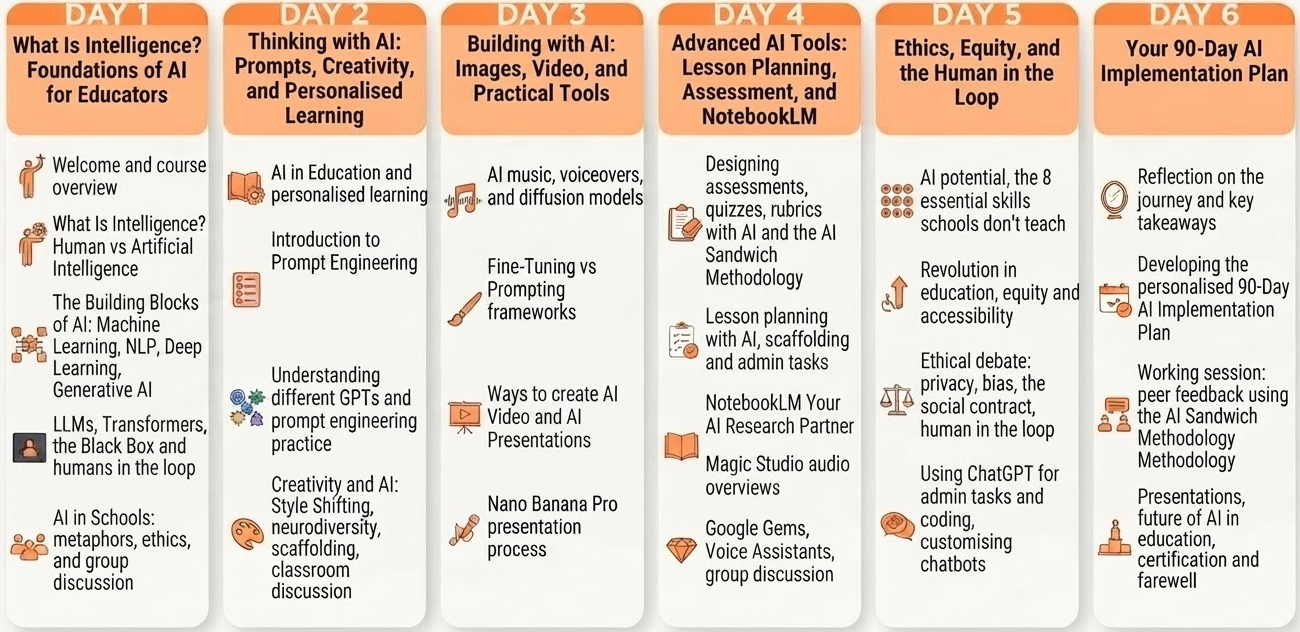
9:00–9:30: Welcome, introductions, and course overview.
9:30–10:30: What Is Intelligence? Defining human and artificial intelligence, the probabilistic nature of both, and why it matters.
10:45–11:00: Coffee break.
11:00–12:00: The Building Blocks of AI: Machine Learning, NLP, Deep Learning, and Generative AI — how they connect and why they matter in education.
12:00–13:00: LLMs, Transformers, GPTs, and the Black Box: What actually happens inside AI systems, and why a human must always be in the loop.
13:00–14:00: AI in Schools: the stochastic parrot, the cave wolf, the black box — metaphors, ethics, and group discussion on AI’s potential and risks.
-
9:00–10:00: AI in Education: personalised learning, learning at your own pace, and how AI is changing what students need to know.
10:00–11:00: Introduction to Prompt Engineering: the T-C-R-E-I, R-O-S-E, and S-C-E-T frameworks. Build your own detailed prompt.
10:45–11:00: Coffee break.
11:00–12:00: Understanding different GPTs and their strengths. Simple vs. detailed prompts. Prompt engineering practice.
12:00–14:00: Creativity and AI: the Creativity Showdown, why constraints unlock creativity, Style Shifting for diverse learners, neurodiversity, and scaffolding with AI. Discussion: how could personalised AI change your classroom?
-
9:00–10:00: Horizontal vs. Vertical AI Transformation. How diffusion models and GANs create images. AI vs. Real: Can you tell the difference?
10:00–11:00: Image prompting practice. Fine-Tuning vs. Prompting: understanding the difference and when to use each.
10:45–11:00: Coffee break.
11:00–12:00: Ways to create AI Video. Video prompting, case studies, and AI Presentations & Graphics.
12:00–14:00: AI music, voice overviews, and audio enhancers. AI Presentation Process with Nano Banana Pro & Google Slides. Hands-on creation and peer showcase.
-
9:00–10:00: Designing assessments, quizzes, and grading rubrics with AI. The AI Sandwich Methodology: keeping humans in the driver’s seat.
10:00–11:00: Lesson planning with AI: advanced templates, scaffolding for diverse learners, and using AI for administrative tasks.
10:45–11:00: Coffee break.
11:00–12:30: NotebookLM: Your AI Research Partner. Exploring all Magic Studio features: audio overviews, guides, timelines, and practice.
12:30–14:00: Google Gems: creating a Gem and why it empowers teachers. Voice Assistants and AI. Group discussion: adapting teaching methods with AI.
-
9:00–10:00: Do we understand AI’s incredible potential? The problem with traditional education and the 8 essential skills schools don’t teach.
10:00–11:00: The biggest revolution AI brings to education: failed incentives, the machine and free will, and what equity and accessibility really mean.
10:45–11:00: Coffee break.
11:00–12:30: Ethical debate: AI in schools, privacy, bias, the social contract, and “a human must be in the loop.” Group-led discussion and reflection.
12:30–14:00: Using ChatGPT for administrative tasks and coding with AI. Customising educational tools and chatbots for your context.
-
9:00–9:30: Welcome to Day 6. Reflecting on the full learning journey and identifying key takeaways.
9:30–10:30: Developing your personalised 90-Day AI Implementation Plan: setting goals, choosing tools, and mapping your first steps.
10:30–10:45: Coffee break.
10:45–12:00: Working session: building and refining your 90-Day Plan. Peer feedback and facilitator input using the AI Sandwich Methodology.
12:00–13:00: Presentations: each participant shares their plan and one key tool or approach they are taking back.
13:00–13:30: Exploring the future of AI in education: what’s coming, what’s possible, and what it means to keep the human in the loop.
13:30–13:45: Certificate Awarding Ceremony.
13:45–14:00: Closing session and farewell.
What Participants Take Back
A clear understanding of how AI can support teaching without replacing human judgment.
Practical experience using AI tools for planning, assessment, creativity and communication.
Greater confidence in selecting the right tool for the right educational task.
Better awareness of ethics, bias, privacy and responsible classroom use.
A tested toolkit of platforms ready to use after the course.
Stronger ability to support inclusion, engagement and differentiated learning with AI.
A personalised implementation plan for school, adult education or VET practice.
Ideas and examples shared by educators from other European contexts.
Course Format
Duration: 5-6 training days.
Daily workload: 4–5 hours per day, Monday to Friday, with optional cultural or networking activities depending on the location.
Language: English.
Language requirement: participants should have at least an A2/B1 level of English to actively follow the training and take part in discussions and practical work.
Digital level: no advanced IT knowledge is required for this course; basic confidence using a laptop and online tools is enough. Previous experience with AI tools is a plus, but not necessary
Equipment: participants must bring their own laptop, as devices are not provided during the training.
Target groups: teachers, trainers, school leaders, adult educators, VET staff, Erasmus+ coordinators, and other education professionals.
Adaptation: course examples and activities are adapted to the profile, experience, and educational context of the enrolled group whenever possible.
Funding fit: this course is designed to align with Erasmus+ KA1 staff mobility priorities for SCH, ADU and VET participants.
Course Fee
€80 per participant, per training day
This course fee is designed to align with Erasmus+ KA1 staff mobility funding for eligible SCH, ADU and VET participants.
What is Included:
✔Erasmus+ Fundable: eligible for KA1 grants
✔Flexibility Guaranteed: easy changes with minimal restrictions
✔Full experience: coffee breaks to cultural visits
✔ Certificate of attendance: 5 hours per day, 30h total
Post-Course Training: 80€ voucher on 18+ courses
Travel and Stay Support
We support participants with practical guidance before arrival so they can organise their mobility with more confidence.
We suggest:
✔Accommodation options such as hotels and apartments,
✔Local transportation information, and, airport transfer options,
✔ Half-day and full-day trip ideas, cultural activities and useful local recommendations.
These services are not directly provided by Colony of Creators unless explicitly confirmed in advance, but we do help participants identify the most suitable options for their stay and make the most of their Erasmus+ experience.
100% funded by the Erasmus Plus Program through your Erasmus+ SCH, ADU or VET grant.
Eligible institutions may use Erasmus+ KA1 mobility funding to cover course-related costs according to their approved budget and funding rules.
Request Information About This Erasmus+ AI Course
If you are a teacher, trainer, school leader or Erasmus+ coordinator interested in Smart Teaching: AI-Driven Solutions with ChatGPT and Beyond, use this form to request course details, dates, group options or support for Erasmus+ planning.