Digital Creation, Storytelling & Creativity
Why This Course Matters
Storytelling is one of the most effective ways to teach, communicate and build connection with learners. At the same time, digital tools and AI models have made it easier than ever to create images, videos, voiceovers and music, but many educators do not feel confident choosing tools or building simple workflows they can actually use with students.
This course helps participants move from occasional content creation to a more consistent, AI-supported storytelling practice. Over 6 days, educators explore how to plan stories, write scripts, design scenes, generate visuals and build short videos that fit their teaching goals, school projects and Erasmus+ activities.
Participants work with a small, practical set of tools, including Canva AI for quick visuals and image-to-video, Kling and Veo for text-to-video and image-to-video generation, Google Imagen and OpenArt for image creation and style exploration, Claude for scriptwriting and story development, and ElevenLabs and Suno for voiceovers and music. They also learn how to edit content simply in Canva and CapCut, with DaVinci Resolve as an advanced option for higher proficiency groups.
By the end of the course, participants leave with concrete workflows, ready-to-use stories and a clear, repeatable process they can apply with their learners to support creativity, communication and digital confidence.

What Participants Learn
- Plan educational stories and projects using clear storytelling frameworks such as the Hero’s Journey, problem–solution and transformation narratives.
- Use Claude to brainstorm ideas, write scripts, break down scenes and refine story structure for lessons, projects and campaigns.
- Create images with Google Imagen, Canva AI and OpenArt using text-to-image, image-to-image and combined compositions.
- Generate videos with Kling and Veo using text-to-video, image-to-video and video-to-video workflows, including lip-sync, smart shots and frames-to-video.
- Turn static visuals into short educational videos using Canva image-to-video and simple editing tools.
- Add voiceovers using ElevenLabs to improve clarity, tone and audio quality.
- Create background music, soundscapes and simple sound effects with Suno to support learning and storytelling.
- Edit videos quickly in Canva and CapCut for classroom use and school communication.
- Explore DaVinci Resolve as an advanced editing option for participants with higher proficiency or specific project needs.
- Use prompt engineering techniques and practical frameworks to improve the quality of scripts, visuals, scenes and final outputs.
How the Course Works
- Hands-on learning with story planning and content creation from Day 1.
- Short, focused input on storytelling frameworks, scene planning and prompt engineering.
- Guided practice using Claude to develop scripts, break down scenes and refine educational stories.
- Practical sessions on creating images with Google Imagen, Canva AI and OpenArt, using text-to-image and image-to-image workflows.
- Workshop-based exploration of Kling and Veo for text-to-video, image-to-video, video-to-video, lip-sync, smart shots and frames-to-video.
- Step-by-step integration of voiceovers, music and sound effects using ElevenLabs and Suno.
- Simple editing workflows with Canva and CapCut, plus an optional advanced path in DaVinci Resolve.
- Reflection on how to adapt these tools and workflows to different subjects, age groups and Erasmus+ project themes.
- Continuous feedback and support to help participants build reusable templates and processes they can take back to their institutions.
-
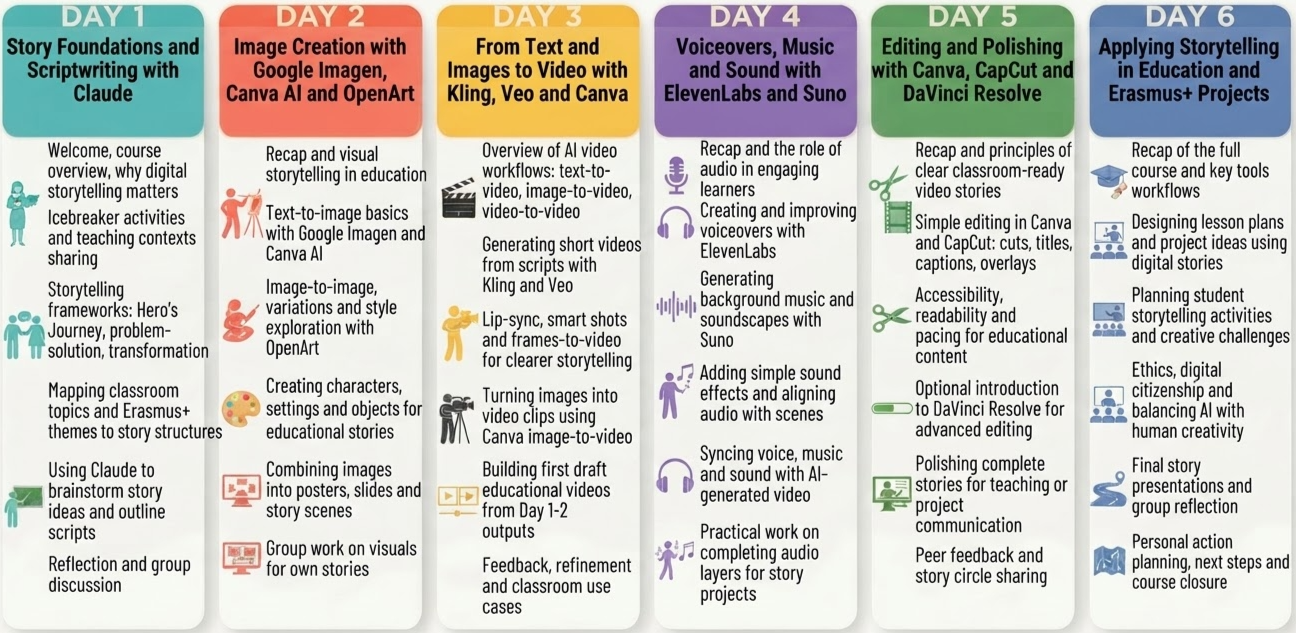
09:00–09:30 | Welcome, course overview and why digital storytelling matters in education
09:30–10:15 | Icebreaker activities and sharing participants’ teaching contexts
10:15–10:30 | Coffee break
10:30–11:00 | Introduction to storytelling frameworks (Hero’s Journey, problem–solution, transformation)
11:00–12:00 | Mapping classroom topics and Erasmus+ themes to story structures
12:00–13:00 | Using Claude to brainstorm story ideas and outline scripts
13:00–14:00 | Reflection and group discussion on how stories can support learning
-
09:00-09:30 I Recap of Day 1 and visual storytelling in education
09:30-10:15 | Text-to-image basics with Google Imagen and Canva AI
10:15-10:30 | Coffee break
10:30-11:00 | Image-to-image, variations and style exploration with OpenArt
11:00-12:00 | Creating characters, settings and objects for educational stories
12:00-13:00 | Combining images into coherent compositions for posters, slides and story scenes
13:00-14:00 | Individual and group work on visuals for participants' own stories
-
09:00-09:30 I Recap and overview of AI video workflows (text-to-video, image-to-video, video-to-video)
09:30-10:15 Generating short videos from scripts with Kling and Veo
10:15-10:30 | Coffee break
10:30-11:00 | Exploring lip-sync, smart shots and frames-to-video for clearer storytelling
11:00-12:00 | Turning images into video clips using Canva image-to-video
12:00-13:00 | Building first draft
educational videos from Day 1-2 outputs
13:00-14:00 | Feedback, refinement and discussion of classroom use cases
-
09:00-09:30 I Recap and the role of audio in engaging learners
09:30-10:15 I Creating and improving voiceovers with ElevenLabs
10:15-10:30 I Coffee break
10:30-11:00 | Generating background music and soundscapes with Suno
11:00-12:00 | Adding simple sound effects and aligning audio with scenes
12:00-13:00 I Syncing voice, music and sound with AI-generated video content
13:00-14:00 I Practical work on completing audio layers for one or more story projects
-
09:00-09:30 I Recap and principles of clear, classroom-ready video stories
09:30-10:15 I Simple editing workflows in Canva and CapCut (cuts, titles, captions, overlays)
10:15-10:30 Coffee break
10:30-11:00 | Accessibility, readability and pacing for educational content
11:00-12:00 | Optional introduction to DaVinci Resolve for advanced editing
12:00-13:00 | Polishing one or two complete stories for teaching or project communication
13:00-14:00 | Peer feedback and story circle sharing
-
09:00-09:30 I Recap of the full course and key tools/workflows
09:30-10:15 | Designing lesson plans and project ideas that use digital stories
10:15-10:30 I Coffee break
10:30-11:00 | Planning student storytelling activities and creative challenges
11:00-12:00 I Discussing ethics, digital citizenship and balancing AI with human creativity
12:00-13:00 I Final story presentations and group reflection
13:00-14:00 I Personal action planning, next steps and course closure
What Participants Take Back
- A clear, repeatable process for planning and creating educational stories using AI-supported tools.
- Practical experience writing scripts and breaking down scenes with Claude for lessons and projects.
- The ability to create images and visual assets using Google Imagen, Canva AI and OpenArt.
- Confidence in using Kling and Veo for text-to-video, image-to-video, video-to-video, lip-sync and smart shots.
- Skills to add voiceovers, music and sound effects with ElevenLabs and Suno.
- Simple editing workflows in Canva and CapCut, plus an understanding of when DaVinci Resolve may be useful.
- Better prompt engineering habits and frameworks to improve the quality of scripts, scenes and outputs.
- Ready-to-use digital stories, videos and visual resources they can apply directly in their teaching and Erasmus+ activities.
- Ideas for student projects and classroom activities that build digital creativity and storytelling skills.
Course Format
Duration: 5-6 training days.
Daily workload: 4–5 hours per day, Monday to Friday, with optional cultural or networking activities depending on the location.
Language: English.
Language requirement: participants should have at least an A2/B1 level of English to actively follow the training and take part in discussions and practical work.
Digital level: no advanced IT knowledge is required for this course; basic confidence using a laptop and online tools is enough. Previous experience with AI tools is a plus, but not necessary
Equipment: participants must bring their own laptop, as devices are not provided during the training.
Target groups: teachers, trainers, school leaders, adult educators, VET staff, Erasmus+ coordinators, and other education professionals.
Adaptation: course examples and activities are adapted to the profile, experience, and educational context of the enrolled group whenever possible.
Funding fit: this course is designed to align with Erasmus+ KA1 staff mobility priorities for SCH, ADU and VET participants.
Course Fee
€80 per participant, per training day
This course fee is designed to align with Erasmus+ KA1 staff mobility funding for eligible SCH, ADU and VET participants.
Included in the course fee:
✔Tuition and training materials
✔Pre-arrival information
✔Location infopack
✔Coffee break
✔Training Certificate
✔Europass Certificate
✔Administrative and organisational support related to the course
Travel and Stay Support
We support participants with practical guidance before arrival so they can organise their mobility with more confidence.
We suggest:
✔Accommodation options such as hotels and apartments,
✔Local transportation information, and, airport transfer options,
✔ Half-day and full-day trip ideas, cultural activities and useful local recommendations.
These services are not directly provided by Colony of Creators unless explicitly confirmed in advance, but we do help participants identify the most suitable options for their stay and make the most of their Erasmus+ experience.
100% funded by the Erasmus Plus Program through your Erasmus+ SCH, ADU or VET grant.
Eligible institutions may use Erasmus+ KA1 mobility funding to cover course-related costs according to their approved budget and funding rules.
Request Information About This Erasmus+ AI Course
If you are a teacher, trainer, school leader or Erasmus+ coordinator interested in Smart Teaching: AI-Driven Solutions with ChatGPT and Beyond, use this form to request course details, dates, group options or support for Erasmus+ planning.