Mastering Canva: A Creative Toolkit for All
DESCRIPTION
A comprehensive, hands-on training designed to empower educators, youth workers, and NGO professionals with the skills to leverage Canva and its AI-integrated features for creating engaging educational materials and community resources.
This course features the latest Canva AI tools, including text generation, image creation, photo enhancement, AI voiceovers, and the new Dream Lab Studio.
Participants will learn to design materials for classrooms, Erasmus+ projects, NGO initiatives, and community storytelling using both foundational design techniques and advanced AI-powered workflows.
Whether you're designing lesson plans, creating marketing materials, building interactive learning experiences with Canva for Education, or producing professional content for social impact, this course covers everything from basic Canva design templates to advanced features including Canva Sheets with Magic Studio, Canva Forms for data collection, and Canva AI Chat for creative collaboration.
Learning Objectives
Create lesson plans, worksheets, newsletters, and community resources using Canva templates and tools.
Edit photos, create videos, integrate audio, add AI voiceovers, and apply animations.
Leverage Canva AI, use AI for text generation, image creation, photo enhancement, and instant design feedback.
Configure classes, lesson plans, invite students, manage assignments, and provide visual feedback.
Create AI quizzes, polls, choice boards, and interactive maps for personalized instruction.
Create multilingual, culturally responsive content for diverse learners.
Use Canva Sheets & Magic Studio to bulk-personalize certificates, reports, and graphics.
Design Canva Forms for surveys, feedback, and registrations.
Use conversational AI to brainstorm ideas and refine designs.
Use Canva VibeCoding to create interactive lessons and classroom gamification.
Explore Affinity software as a free complement to Canva for complex projects.
METHODOLOGY
Hands-On Learning: Active, experiential environment where participants create real resources from Day 1.
Progressive Skill Building: Daily progression from foundational tools to advanced AI features.
Project-Based Practice: Real-world design experience directly linked to teaching or community work.
Canva AI Mastery: Dedicated sessions on text generation, image creation, photo enhancement, and voiceovers.
Canva for Education Setup: Step-by-step support for applying and activating free Teacher Pro accounts.
Interactive Demonstrations: Real-time practice with latest 2025 Canva AI features.
Accessibility Focus: Creating multilingual, culturally responsive materials for diverse learners.
Canva Sheets & Magic Studio: Bulk-personalize visuals for certificates, reports, and graphics.
Canva Forms Integration: Design forms for surveys, feedback, and registrations.
Canva AI Chat: Brainstorm ideas and refine designs with conversational AI.
Affinity Introduction: Bonus module on free, industry-standard design software.
Personalized Feedback: Tailored guidance for applying skills in unique contexts.
-
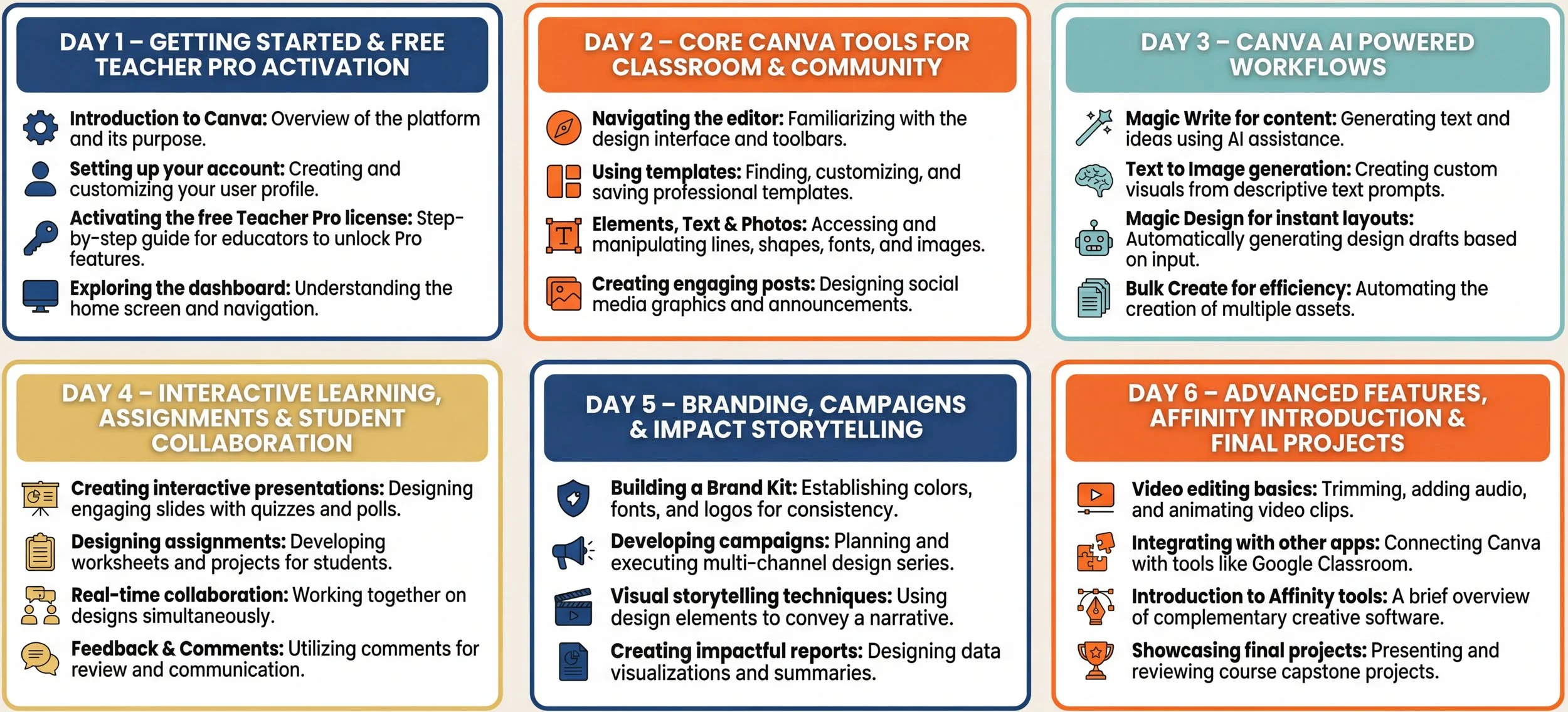
9:00–9:30 – Welcome, introductions, and exploring how Canva supports teaching, youth work, and community projects. Overview of course structure and participant expectations.
9:30–10:00 – Introduction to Canva.com and the Canva app; overview of Canva Free, Canva Pro, and Canva for Education (what's new in 2025 with Canva AI integration).
10:00–10:15 – Coffee break.
10:15–11:00 – Guided walkthrough for applying for and activating Canva for Education (free teacher Pro) accounts. Eligibility tips, verification process, and troubleshooting. Teachers set up their first class space.
11:00–12:00 – Understanding copyright, licensing, and Canva's legal usage and media policies, with practical examples for schools and NGOs. Ethics of using AI-generated content in educational materials.
12:00–13:00 – Personalizing your workspace: creating folders, building brand kits, exploring and favoriting templates relevant to your subject area or community work.
13:00–14:00 – Practical session: Each participant adapts templates to create a welcome poster and a simple two-page resource (classroom material or community information pack). Peer feedback included.
-
9:00–9:30 – Tour of Canva's essential tools: text, elements, photos, uploads, design styles, brand kits, and the updated interface for education users.
9:30–10:30 – Creating lesson materials and worksheets from education templates; structuring content clearly and accessibly for diverse learners. Using color, fonts, and spacing for readability.
10:30–10:45 – Coffee break.
10:45–11:45 – Canva Sheets & Magic Studio Mastery: Upload spreadsheet data and transform it into bulk personalized branded visuals—perfect for generating customized classroom certificates, report cards, personalized donor recognition graphics, or event registrations. Live demo and hands-on practice.
10:45–12:00 – Designs for NGOs and community: flyers, social media posts, event invitations, and simple infographics. Focus on inclusive, multilingual, and culturally representative design.
12:00–13:00 – Group task: Small groups design an "info pack" or campaign set for a real or fictional class project or community event (e.g., Erasmus+ dissemination materials, community awareness campaign).
13:00–14:00 – Feedback circle: Groups present, receive peer feedback, and make quick tweaks to improve accessibility, readability, and cultural inclusivity.
-
9:00–9:30 – Introduction to Canva AI: opportunities, limitations, and risks of AI in education and social work. Ethical considerations and best practices for using AI-generated content.
9:30–10:30 – Canva AI Text Generation: Draft lesson outlines, project briefs, assessment rubrics, parent letters, and grant/project text using AI assistance. Hands-on practice: Participants use AI text features to create one real resource they need (e.g., a unit outline or a donor communication).
10:30–10:45 – Coffee break.
10:45–11:30 – Canva AI Image Creation: Creating curriculum-aligned custom visuals (science diagrams, historical scenes, cultural imagery, inclusive representation, and campaign visuals). Practice session with real scenarios (e.g., "create an illustration of a diverse community garden").
11:30–12:30 – Canva AI Enhancement Tools: Photo enhancement, background removal, AI voiceovers, and audio for flipped classroom videos and youth storytelling projects. Live demo and hands-on practice.
12:00–12:30 – Canva AI Chat as a Creative Collaborator: Using conversational AI to brainstorm design ideas, get instant feedback on visual projects, and receive design recommendations. Participants practice with real design scenarios.
12:30–13:30 – Practical session: Each participant creates one AI-powered resource (e.g., a mini-lesson video with AI voiceover, a campaign post set with AI-generated images, or an explainer animation).
-
9:00–11:00 Creating animations, videos, and audio projects.
11:00–11:15 Coffee Break.
11:15–12:00 Adding and editing video content.
12:00–13:00 Combining media to produce cohesive films.
13:00–14:00 Using Canva’s recording studio.
-
9:00–11:00 - Exploring Dream Lab’s Animation, Video, and Audio Creation Tools
11:00–11:15 - Coffee Break
11:15–12:00 - Adding and Editing Content in Dream Lab’s Video Editing Studio
12:00–13:00 - Combining Media Elements to Create Cohesive Films Using Dream Lab
13:00–14:00 - Recording, Editing, and Syncing Audio in Dream Lab’s Recording Studio
-
9:00–11:00 Hosting webinars using Canva tools.
11:00–11:15 Coffee Break.
11:15–12:00 Sharing projects as templates for collaboration.
12:00–12:45 Utilizing Canva Boards for project management.
12:45–13:30 Publishing websites with free and paid domains.
13:30–14:00 Presentation of final projects and course wrap-up.
RESULTS
Design for classrooms and communities: Create lesson plans, worksheets, quizzes, choice boards, classroom displays, newsletters, and community materials for Erasmus+ projects and NGO initiatives.
Master Canva's core tools: Photo editing, video creation, audio integration, AI voiceovers, animations, screen recording, and advanced design techniques.
Leverage Canva AI effectively: Text generation, custom image creation, photo enhancement, AI voiceovers, and AI Chat for creative collaboration.
Set up and manage Canva for Education: Configure classes, invite students, create collaborative spaces, assign work, and provide visual feedback.
Build interactive learning experiences: Use Assignments & Classwork Hub, Canva Code, AI quizzes, polls, and interactive maps for personalized education.
Create culturally responsive content: Design multilingual, inclusive materials for diverse learners and community storytelling.
Transform data into visuals: Use Canva Sheets with Magic Studio to bulk personalize certificates, reports, and donor recognition graphics.
Collect and manage data: Create Canva Forms for surveys, feedback, registrations from students and community members.
Publish with confidence: Understand copyright, legal usage policies, and ethical media practices for responsible design sharing.
Course Format
One-week length: two weeks or other formats are available on request.
4-5 hours per day: from Monday to Friday, with excursions planned during the training.
Fully fundable: Meeting the Erasmus+ KA1 budget criteria.
Flexible: change courses, locations, or dates without fees.
Audience and requirements
Courses are structured around the collective sharing of participants’ experiences, therefore all courses are in English. For participants with a very low English level, we advised to come with a translator in the team.
We provide tailored courses for school roles like teachers, principals, and staff, as well as for different levels of IT skills. Our programs are designed to meet the unique needs of professionals such as adult educators, language teachers, youth workers, and social workers, ensuring they have a meaningful impact in education and social work.
€80/ day
Our services include:
✔ Infopack about the location
✔ Pre-arrival information.
✔ Tuition & training materials.
✔ Coffee break.
✔ Training Certificate.
✔Europass Certificate.
✔ Admin & organisational costs.
Additional Services:
✔ Accommodation options, including hotels and self-catering apartments
✔ Half-day and full-day trips
✔ Cultural experiences and local activities
✔ Airport transfer services
✔ Local transportation arrangements
Our Pricing:
100% funded by the Erasmus Plus Program

Fill out our contact form, and we’ll respond to you promptly.
